Intel & Insights
How to use the weekly action plan
What "What to do next" suggests, how to work through it, and how to tell the planner what you don't want.
Action plan — the What to do next page under Insights in the sidebar — turns the week’s detected competitor changes into a short list of things you could actually do about them. The sidebar link carries a badge with the number of suggestions still waiting on you.
When plans are generated
A new plan is generated every Monday morning (UTC), after the weekend’s pricing, roadmap, review and SEO fetches have landed and before the weekly digest goes out. New workspaces don’t wait for Monday — your first baseline plan is generated within about an hour of your competitors’ first data arriving.
Plans are generated for workspaces that track at least one competitor besides their own product.
What’s in a suggestion
Each item carries:
- An angle (Pricing, SEO, Content, Features, Roadmap, Reviews, Hiring, News, Paid search) and an urgency — high, medium, or low.
- Why it matters — the reasoning behind the suggestion.
- A 30-minute first step — the smallest concrete thing you could do next.
- Evidence — the specific tracked changes the suggestion was built from.
Suggestions carried over from a previous week are distinguished from net-new ones, so a plan reads as “what changed” rather than the same list every Monday.
Work through the list
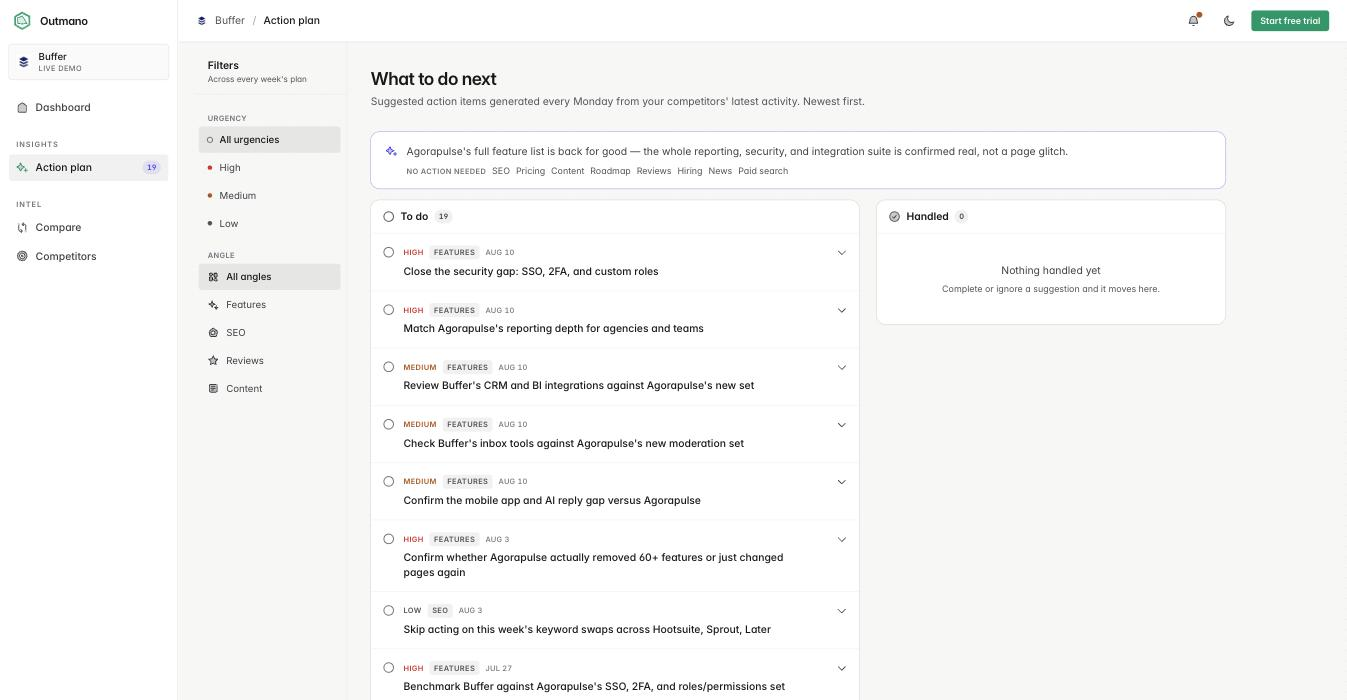
The page splits into To do and Handled:
- Mark an item done when you’ve acted on it.
- Ignore an item you’re not going to act on (see below).
Both move the item into Handled, and Undo puts it back. The distinction matters for the record and for the next plan: ignored suggestions are fed back to the planner so it stops re-proposing them, and completed ones tell it the work is done.
Ignore a suggestion and say why
A reason is optional, but it is what makes the next plan sharper: the planner reads every reason you give, for as long as it holds.
- Open the ⋯ menu on a suggestion and click Ignore….
- Pick a reason: Not relevant to us, We already do this, Not a priority right now, or Wrong read of the data.
- If the reason needs it, add a note in your own words under Anything the planner should know? Tick Remember this note for every future plan to keep it as a standing rule rather than a one-off.
- If the suggestion was about specific search terms, tick the ones you never want actions about under Stop suggesting actions about these search terms.
- Tick Skip all [angle] suggestions from now on if the whole angle is not for you.
- Click Ignore suggestion.
The item moves to Handled with the reason next to it. Undo puts it back and withdraws the reason. To skip the dialog, click Ignore without a reason at its bottom; a Why? link on the handled row lets you add one later.
Set standing rules
Rules apply to every future plan until you remove them. Ticking the boxes in the ignore dialog creates them for you; you can also manage them directly.
- Open Planning rules above the To do list.
- Add a search term to skip, an angle to skip, a competitor to leave out, or a standing note in your own words, then click Add.
- Remove a rule with the × on its chip.
A skipped angle or competitor never reaches the planner at all. A skipped search term is stripped from the signals it reads and from any suggestion it returns.
See what the planner has learned
The bottom of Planning rules shows What the planner has learned from your feedback: a short note condensed from every suggestion you ignored and the reasons you gave. It is rebuilt right before each new plan, so its footer says when it was last written and whether newer feedback is waiting. Undo an ignore to change what it says.
Filter the list
Filter chips above the list narrow it by urgency and by angle. The angle chips only show angles that actually appear in the plans on screen, so a chip is never a dead end.
History
The page shows your most recent plans together as one date-ordered feed, newest and most urgent first — so past weeks stay readable without hunting through separate cards.