Intel & Insights
How to read the Content tab
What a competitor publishes, how often, and the strategy behind it — plus what to do when Outmano can't find their feed.
Every competitor has a Content tab: every blog post Outmano has collected from them, an AI read of what their content programme is for, and a calendar of how often they ship it. Content is a ranked angle — see Understanding the angles — so the same posts also feed their Content score in Compare.
Where the posts come from
The line under the heading says where the posts are coming from, and when they were last synced:
- Feed connected — Outmano found their RSS or Atom feed and is reading it. The feed URL is shown next to it.
- No RSS/Atom feed found — Outmano looked and came up empty. Posts can still arrive from the site’s sitemap, but a feed is more reliable; use Add feed URL manually (or Settings in the competitor’s sidebar) if you know it.
- Checking for a feed… — the first probe hasn’t run yet. Give it a minute.
New posts are collected daily. The Refresh button in the top-right re-fetches the feed immediately if you don’t want to wait.
Content Strategy
Once at least three posts are in, Outmano reads a sample of them and writes up their content strategy. Until then the card says Analyzing content strategy….
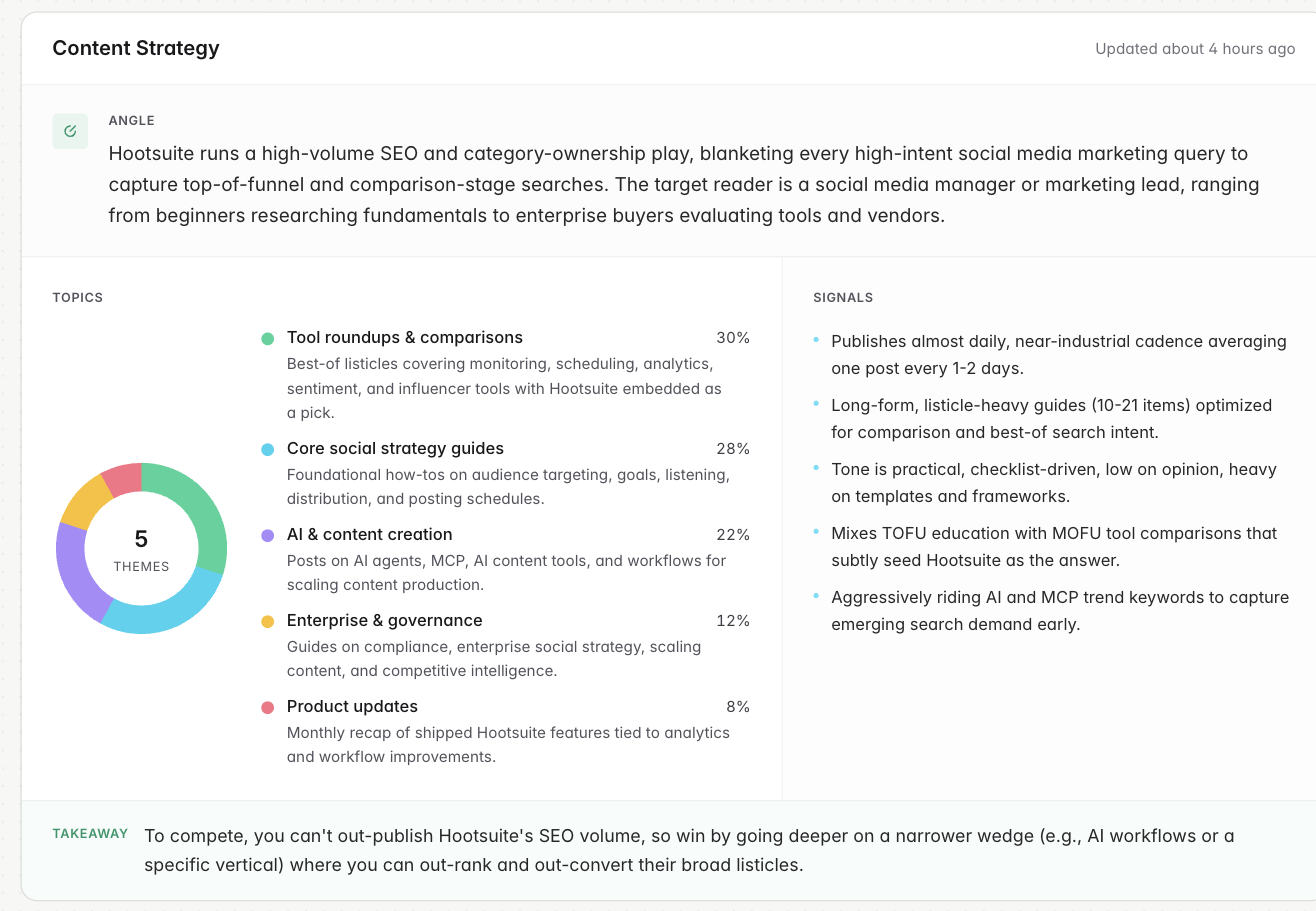
- Angle — a one-paragraph read of who the blog is written for and what it’s trying to do.
- Topics — the handful of themes they keep returning to, as a donut with a share of posts for each and a line on what each theme covers.
- Signals — four or five short operating tells: cadence, how deep the posts go, tone, and where in the funnel they’re aimed.
- Takeaway — what this strategy means for you, competing against them.
The write-up is refreshed when new posts arrive, and at least every two weeks, and the Updated stamp on the card tells you which reading you’re looking at. It’s written from your workspace’s point of view, so two customers tracking the same competitor can see different takeaways. Your own product’s Content tab has the same card, titled Your Content Strategy, with a Focus line in place of the takeaway.
Publishing Calendar
A four-month heatmap of posts per day. Hover a day to see how many posts were published and their titles. The value here is the shape rather than any one square: a steady drumbeat, a burst around a launch, or a blog that quietly stopped.
The post list
Below the calendar, every post Outmano has collected, newest first, twenty to a page: the title (linking out to the post), a short summary, when it was published, the author where the feed names one, and up to three tags. Tags are the feed’s own categories when it supplies them; otherwise Outmano classifies each post into a fixed set of topics — How-to & tutorials, Comparisons, Case studies, Product updates and the like — so the same vocabulary is used across every competitor and topic overlap between two blogs is a fair comparison.
What raises a change
- Every new post lands in the change feed as it’s found, and the weekly digest lists up to three per competitor.
- A publishing surge — at least four posts in the last 30 days and double their usual monthly rate — and a freeze — sixty quiet days from a blog that used to publish regularly — are flagged as important changes in the feed and the digest. Both need a few months of history before Outmano will call them, so a competitor added last week won’t trigger either yet.
New posts can be routed to Slack alerts by ticking Content on the Integrations → Slack page.