Intel & Insights
How to read a competitor's SEO tab
Their organic footprint over time, the keywords you both fight over, and the ones they rank for and you don't.
Every competitor has an SEO tab: what their organic search presence looks like now, how it has moved, and — because Outmano also tracks your own product — how it compares with yours.
Pick a comparison window
The Compare row at the top of the tab sets what “changed” is measured against: vs. 1 week ago, 1 month, 3 months, 6 months or 1 year. Every delta on the page is relative to the window you pick, and the exact date being compared to is shown on the right. Readings are matched to the closest one taken around that date, so a window with no reading yet says so rather than inventing a baseline.
The headline numbers
Six figures, each with its change over the selected window:
- Organic Keywords — how many terms they rank for
- Top 3 and Top 10 — how many of those sit in the positions that get clicked
- Traffic Value — what their organic traffic would cost to buy through ads
- Ref. Domains and Backlinks — the size and spread of their link profile
Domain rating sits above these with a sparkline of every reading Outmano has taken, so you can see the trend rather than one number in isolation.
These are the same metrics that feed the SEO score in Compare — see Understanding the angles for how scoring works.
This week’s moves
Below the keyword rankings, This week’s moves lists the keyword movements from the latest weekly fetch that actually change your position — worded from your side, such as moved ahead of you on “project status page” (#4, you’re #9) or now ranks #3 for your brand. Each row shows the keyword, their previous and current position, yours, monthly volume, and why it matters (Passed you, Your brand, You don’t rank, and so on), with a suggested next step above the table.
Moves that don’t affect you are filtered out and counted underneath — their own brand terms, low-volume keywords, off-topic terms, and small wobbles — so a quiet week reads Nothing that changes your position this week rather than a wall of noise. A rival gaining on your exact brand term is marked critical; the rest of the moves that cross your position are important.
Keyword Overlap
Below the rankings, Keyword Overlap compares their keyword set with your own product’s, split three ways: Shared, Only You, and Only Them.
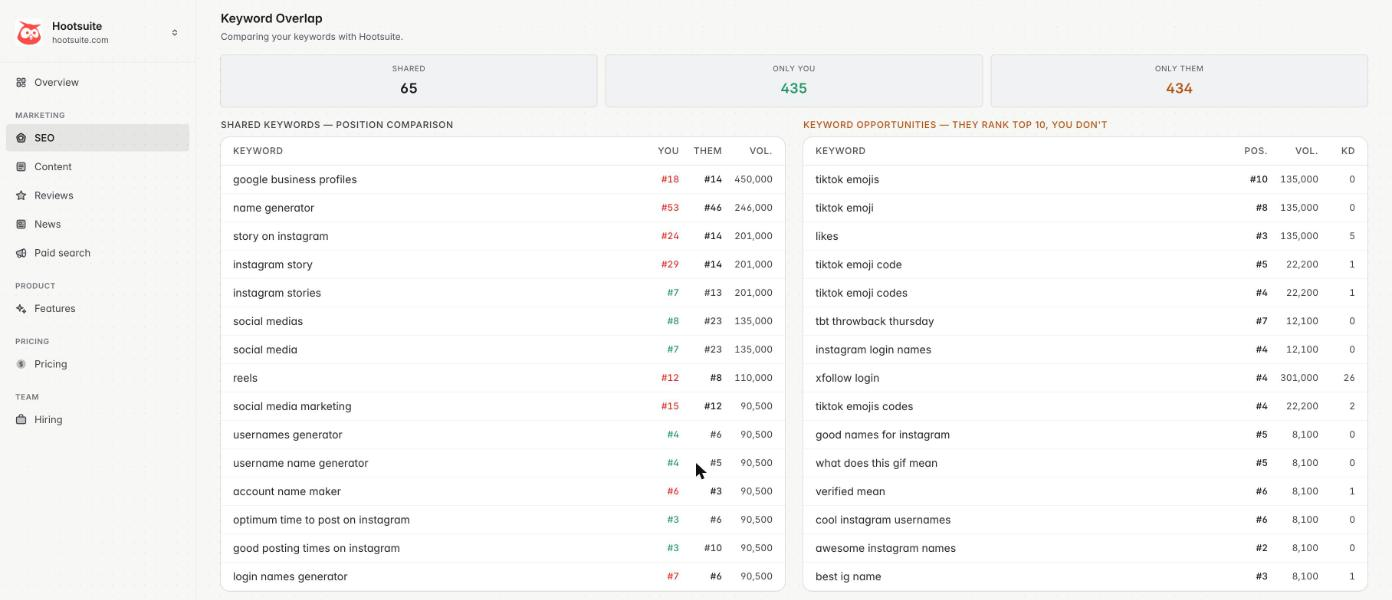
Shared Keywords lists the terms you both rank for with your position beside theirs — green where you’re ahead, red where you’re behind. This is the list to argue with when someone says “we’re doing fine on SEO”: it’s the head-to-head, term by term.
Keyword Opportunities
Keyword Opportunities — They Rank Top 10, You Don’t is the part worth acting on. It takes the keywords where they hold a top-10 position, drops everything you already rank for and everything with no search volume, and sorts what’s left by search volume against keyword difficulty — so cheap wins with real demand float to the top rather than vanity terms nobody searches.
Each row shows their position, the monthly search volume, and the keyword difficulty (KD, 0–100). A high-volume, low-KD row is the strongest signal on the page.
This section only appears once your own product has a keyword snapshot of its own. If it’s missing, check that your own product is tracked — see Setting up your workspace.
The rest of the tab
- Top Keywords and Top Pages — where their traffic actually comes from.
- Content Strategy — how their ranking keywords break down by intent.
- Organic Traffic Share — every competitor you track, sized by traffic value, so you can see who owns the category.
- Reading History — every SEO reading Outmano has taken for them.
How often it refreshes
SEO readings and ranked keywords are re-fetched weekly, in the small hours of Monday UTC. There’s no manual refresh for SEO. Significant movement raises entries in the change feed, and can be routed to Slack alerts and the weekly digest.